LLM

[Kubernetes,K8s]쿠버네티스

낑낑이 2025. 8. 13. 16:56

쿠버네티스가 왜 필요할까,..

무거운 VM을 해결하기 위해 등장한것이 Docekr Container이다

하지만 서비스가 커질수록 관리해야하는 Container양이 급격히 증가하고, 일반적인 물리 서버로는 관리가 어렵게 된다

컨테이너(Docker 등)만으로도 앱을 띄울 수 있지만,

  • 서버가 많아지면 "어디에 배포하지?"
  • 장애가 나면 "다시 어떻게 살리지?"
  • 트래픽이 많아지면 "얼마나 확장하지?"
    이런 문제들이 생깁니다.

쿠버네티스는 이런 작업을 자동화해 줍니다. =>자동 배포, 로드밸런싱, 장애 복구, 확장, 롤백 등 가능.


쿠버네티스를 이용할때 yaml file이 필요하다

apiVersion: apps/v1
kind: Deployment
metadata:
  name: sk106-posts-get
  namespace: skala-practice
spec:
  replicas: 1
  selector:
    matchLabels:
      app: sk106-posts-get
  template:
    metadata:
      annotations:
        prometheus.io/scrape: 'true'
        prometheus.io/port: '8080'
        prometheus.io/path: '/prometheus'
        update: update1000
      labels:
        app: sk106-posts-get
    spec:
      containers:
      - name: sk106-posts-get
        image: amdp-registry.skala-ai.com/skala25a/sk106-posts-get.amd64:1.0
        imagePullPolicy: Always

이거 뭔지모르겠으니까 하나하나 보면

apiVersion: apps/v1      # 쿠버네티스 API 버전
kind: Deployment         # 리소스 종류 (Deployment)
metadata:
  name: sk106-posts-get  # Deployment 이름
  namespace: skala-practice  # 배포할 네임스페이스


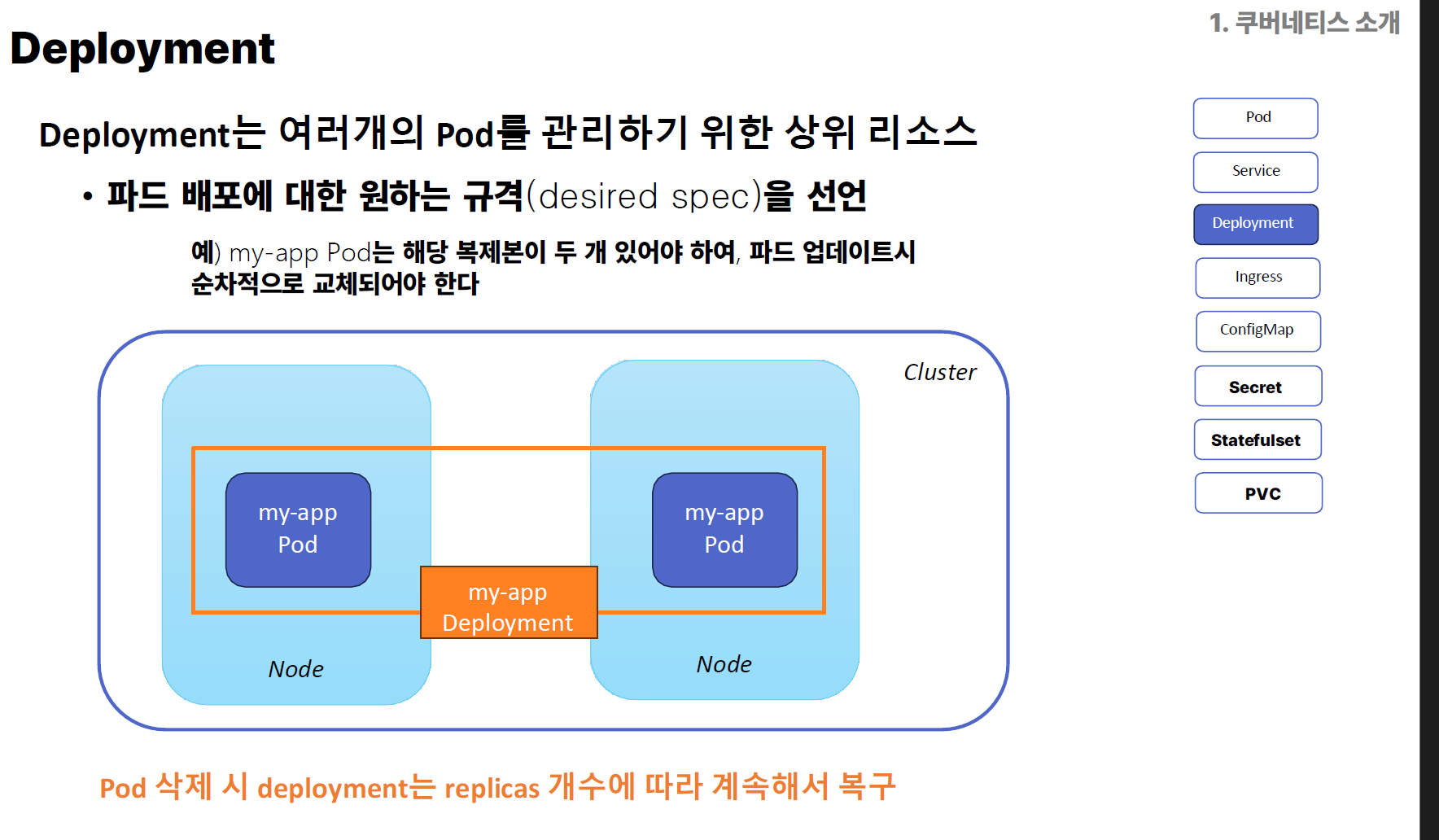
  • Deployment → Pod를 원하는 수만큼 복제하고, 업데이트·롤백 관리
  • namespace → 쿠버네티스 리소스를 논리적으로 구분하는 영역

spec:
  replicas: 1             # 실행할 Pod 개수
  selector:
    matchLabels:
      app: sk106-posts-get


  • replicas → Pod 몇 개를 띄울지 지정 (여기서는 1개)
  • selector.matchLabels → 어떤 라벨을 가진 Pod를 이 Deployment가 관리할지 결정


  template:               # Pod 템플릿 (이대로 Pod를 생성)
    metadata:
      annotations:
        prometheus.io/scrape: 'true'
        prometheus.io/port: '8080'
        prometheus.io/path: '/prometheus'
        update: update1000
      labels:
        app: sk106-posts-get


  • annotations → 모니터링 툴(Prometheus)이 메트릭을 수집하도록 설정
  • labels → Pod 식별용 태그 (Service, Selector 등에서 활용)

    spec:
      containers:
      - name: sk106-posts-get
        image: amdp-registry.skala-ai.com/skala25a/sk106-posts-get.amd64:1.0
        imagePullPolicy: Always


  • containers → Pod 안에 들어갈 컨테이너 정의
  • image → Docker 이미지 경로
    (여기선 사설 레지스트리 amdp-registry.skala-ai.com에서 가져옴)
  • imagePullPolicy: Always → 매번 최신 이미지를 레지스트리에서 가져옴

정리


  • YAML → Deployment 생성
  • Deployment → 지정한 Pod 개수만큼 생성 (여기선 1개)
  • Pod → 내부에 sk106-posts-get 컨테이너 1개 포함
  • 쿠버네티스 스케줄러 → Pod를 클러스터 내 적절한 노드에 배치
  • Service(별도 YAML 필요) → 외부에서 접근 가능하게 라우팅


Pod는 보통 여러개의 Container로 구성되어있고

Cluster는 여러개의 pod으로 구성되어 있다
 

  • 개발자(배포자)
    • 애플리케이션 코드 작성 → Dockerfile로 컨테이너 이미지 생성
    • 이미지를 컨테이너 레지스트리(예: Docker Hub, 사설 레지스트리)에 업로드
  • 쿠버네티스 배포
    • Deployment YAML 작성 → 해당 Docker 이미지를 Pod로 생성
    • Pod는 쿠버네티스 클러스터 내부에서 동작
  • 외부 접근 준비
    • Pod는 기본적으로 클러스터 내부 IP만 가짐 (외부에서 직접 접근 불가)
    • 그래서 Service를 만들어 Pod에 고정된 접근 포인트를 부여
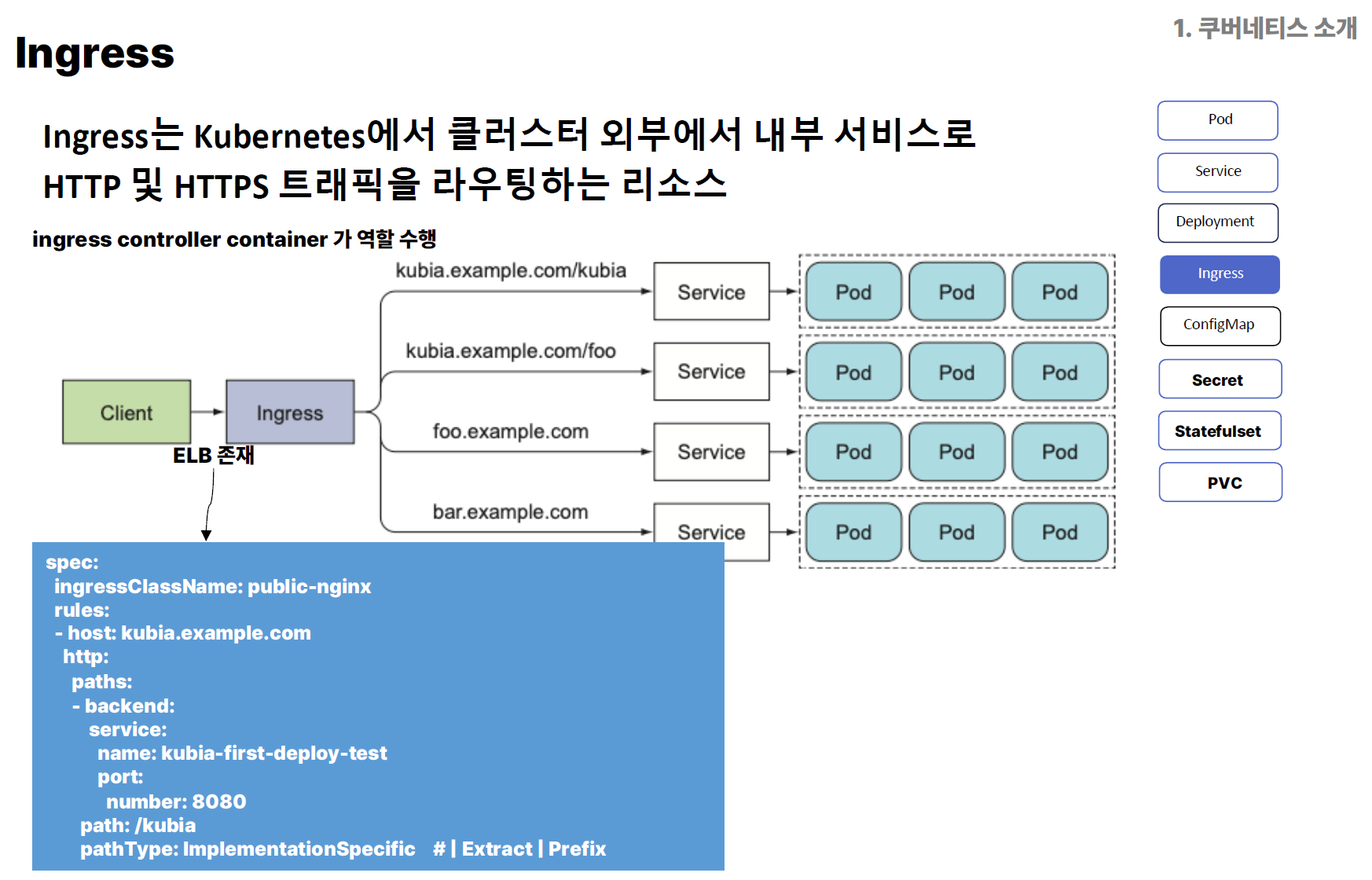
    • HTTP/HTTPS 기반의 라우팅이 필요하면 Ingress를 설정
  • Ingress 역할
    • 클러스터 외부 도메인/URL 경로 → 내부 Service → Pod 로 라우팅
    • 예:
      • 사용자가 kubia.example.com/kubia 요청
      • Ingress Controller가 해당 요청을 kubia-first-deploy-test Service로 전달
      • Service가 적절한 Pod로 요청을 분배(로드밸런싱)

Kubernetese Boundary


1.실습


1.docker login 시켜놓기

docker login amdp-registry.skala-ai.com/skala25a
Authenticating with existing credentials...
Login Succeeded


#기존에 있는 image를 Pod으로 형성하는것 

kubectl run sk106-nginx --image=nginx --port=80 -n skala-practice


  • kubectl run
    • 간단히 Pod를 하나 실행하는 명령 (Deployment가 아니라 1회성 Pod 생성)
    • Kubernetes 1.18 이후로는 주로 테스트나 단일 Pod 실행할 때 사용
  • sk106-nginx
    • 새로 만들 Pod의 이름
  • --image=nginx
    • Docker Hub에서 기본 nginx 이미지를 가져와서 실행
  • --port=80
    • Pod의 컨테이너에서 80 포트를 오픈 (nginx 기본 HTTP 포트)
  • -n skala-practice
    • Pod를 skala-practice 네임스페이스에 생성


#pod 배포, 정상 배포 여부 확인 (kubectl get pod {pod-name})

kubectl get pod sk106-nginx


에러1

kubectl run sk106-nginx --image=nginx --port=80 -n skala-practice
Error from server (AlreadyExists): pods "sk106-nginx" already exists
kubectl get pod sk106-nginx
Error from server (NotFound): pods "sk106-nginx\ufeff" not found


존재하는데 이렇게되는경우는 띄어쓰기나 유니코드 때문이다

kubectl delete pod "sk106-nginx" -n skala-practice

지워주기!


# 로컬(혹은 지정한 IP) 포트 → Kubernetes Pod의 포트로 트래픽을 터널링(포트포워딩)하는 명령

kubectl port-forward pod/sk106-nginx --address 0.0.0.0 8080:80 -n skala-practice

기본적으로 port-forwarding만하면 local에서만 접속이 가능하다.

접속이 잘 되는지 확인하여야한다!

8080:80

local Port 8080

Pod container 80


#Pod에 대한 Service 생성

kubectl expose pod sk106-nginx --port=8080 --target-port=80


요고는 실행중인 Pod이 있으면 지금 제 로컬에서만 돌아가는건데 Expose를 통해 외부에서도 접속 할 수 있도록 하는것입니담


### 배포확인

 kubectl get pod sk106-nginx -n skala-practice
NAME          READY   STATUS    RESTARTS   AGE
sk106-nginx   1/1     Running   0          7m2s


이렇게 뜨더라고용


###########

여기까지는 Docker에 login하고 현재 내 Docker Image가 있는것을 이용하여,

1.Conatiner를 통해 Pod을 형성하고

2.kuber를 이용하여 port farwarding

3.다른사람들이 접속할수있도록 expose까지


# pod.yaml deploy.yaml, service.yaml 을 이용하기

1.pod.yaml

#pod.yaml

apiVersion: v1
kind: Pod
metadata:
  name: sk106-nginx
  labels:
    app: sk106-nginx
spec:
  containers:
    - name: sk106-nginx
      image: nginx
      ports:
        - containerPort: 8080


위에 처럼 terminal에 하나하나 입력하지 않고 yaml파일로 구성하여 단순히 터미널에 kubectl run -f pod.yaml -n skala-practice를 실행하여 pod을 형성할수 있다.

kubectl apply  -f pod.yaml


kubectl get pod sk106-nginx -n skala-practice


kubectl port-forward --address 0.0.0.0 pod/sk106-nginx 8080 -n skala-practice

여기에 컨테이너 포트가 없고 로컬포트만 있는 이유는 yaml파일에 컨테이너 포트가 포함되어있당~~


에러 2

kubectl run -f pod.yaml -n skala-practice


error: required flag(s) "image" not set


kubectl apply  -f pod.yaml

Warning: resource pods/sk106-nginx is missing the kubectl.kubernetes.io/last-applied-configuration annotation which is required by kubectl apply. kubectl apply should only be used on resources created declaratively by either kubectl create --save-config or kubectl apply. The missing annotation will be patched automatically.
pod/sk106-nginx configured


apply를 적용하면 되는고가타용


#env.properties

vi env.properties 실행하고 터미널에서 생성되면 쓸때는 INSERT, 그만 쓸때는 OUT하고 :wq쓰고 나오면 된당


#Deploy.yaml

왜 Deployment를 쓰는가?

Pod를 자동으로 관리

  • Pod가 죽으면 자동으로 재생성
  • 필요한 개수(replicas)만큼 항상 유지
  • 수동으로 Pod 만들 때(kubectl run)는 이런 기능 없음


apiVersion: apps/v1
kind: Deployment
metadata:
  name: sk106-first-deploy-test
  namespace: skala-practice
spec:
  replicas: 1
  selector:
    matchLabels:
      app: sk106-first-deploy-test
  template:
    metadata:
      annotations:
        prometheus.io/scrape: 'true'
        prometheus.io/port: '8080'
        prometheus.io/path: '/prometheus'
        update: e8c24298b888a2dc0795de1564bca2da
      labels:
        app: sk106-first-deploy-test
    spec:
      serviceAccountName: default
      affinity:

      containers:
      - name: webserver
        image: amdp-registry.skala-ai.com/skala25a/sk106-webserver:1.0.0
        imagePullPolicy: Always
        env:
        - name: LOGGING_LEVEL
          value:
        - name: USER_NAME
          value: sk106
      tolerations:
      - effect:
        key: skala-k8s-practice
        operator: Equal
        value: "yes"


root@BOOK-8FCGNUSNRC:~/kubercluster# kubectl apply -f deploy.yaml
deployment.apps/sk106-deploy-test created


 1. deploy 배포
$ kubectl apply –f deploy.yaml
 2. 배포 현황 확인
$ k get deploy
 3. pod 현황 확인
$ k get pod


#Service.yaml

왜 Service를 쓰는가?

Service는 고정 DNS 이름을 제공해, IP가 바뀌어도 항상 같은 이름으로 접근 가능

kuberenetice를 실행하면 내부에 자동적으로 IP를 매칭해주기 위해 Service를 사용해야한다


apiVersion: v1
kind: Service
metadata:
  name: sk106-first-deploy-test
  namespace: skala-practice
spec:
  selector:
    app: sk106-first-deploy-test
  ports:
    - name: http
      protocol: TCP
      port: 8080
      targetPort: 8080
  type: ClusterIP

 1. service 배포
$ kubectl apply –f service.yaml
 2. 배포 현황 확인
$ k get service
 3. routing endpoint 확인
$ k get endpoints

kubectl get endpoints에서 보이는 Endpoint
Kubernetes Service가 실제로 연결하는 Pod들의 IP와 포트 목록입니다.


service를 통해 실행이 되면 service를 통해 IP들이 자동 할당되는 것을 볼 수 있다.


kubectl port-forward svc/sk106-deploy-test --address 0.0.0.0 8080:8080
error: unable to forward port because pod is not running. Current status=Pending


kubectl delete pod sk106-deploy-test-778799f8d7-z9rbj -n skala-practice


Pending이 나오는건 pod가 너무 많이 생성되서 그러는거 

kubectl get pod -n skala-practice | awk '/^sk106/{print $1}' | \
xargs -r kubectl delete pod -n skala-practice

sk106인 이름파일 모두 삭제


1. 쿠버네티스로 앱 실행시켜보기!


https://amdp-registry.skala-ai.com/harbor/sign-in?redirect_url=%2Fharbor%2Fprojects


Harbor


amdp-registry.skala-ai.com


해당경로를 들어가 docker file을 다운받자
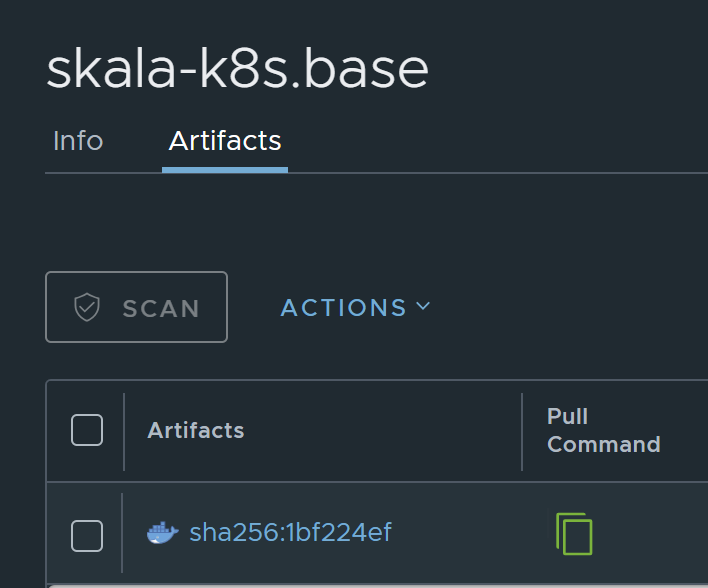
저거 복사를 먼저 해주고
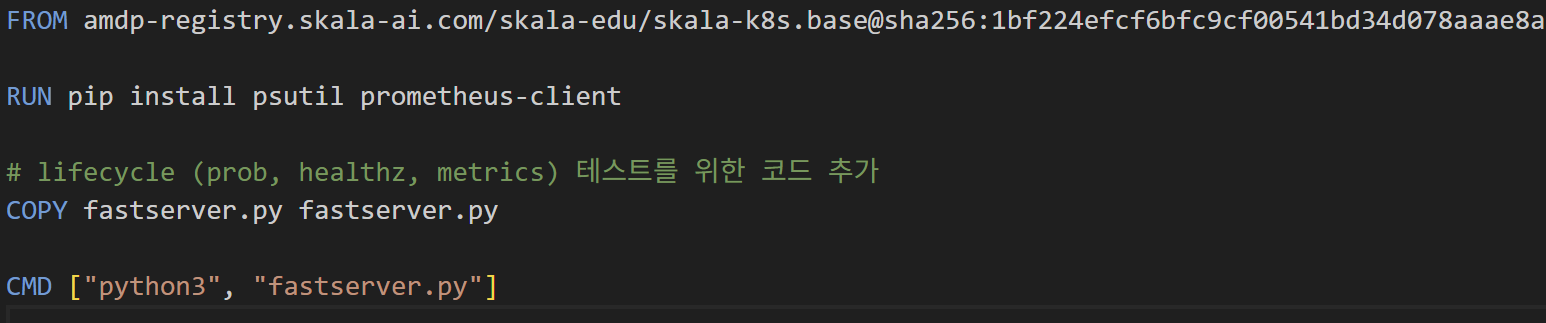


저기 FROM 부분을 수정해줘야한다


docker pull

레지스트리(Docker Hub, 프라이빗 레지스트리 등)에서 이미지를 가져오는 명령

docker pull <이미지이름>:<태그>
docker pull nginx:1.25

docker build

Dockerfile을 기반으로 새로운 이미지를 빌드(생성)하는 명령

docker build -t <이미지이름>:<태그> <빌드컨텍스트경로>
docker build -t my-nginx:1.0 .

docker run

이미지를 기반으로 컨테이너를 실행하는 명령

docker run [옵션] <이미지이름>:<태그>
docker run -d --name my-nginx -p 8080:80 my-nginx:1.0

docker push

로컬에 있는 이미지를 레지스트리에 업로드하는 명령

docker push <레지스트리주소>/<레포지토리>/<이미지이름>:<태그>

docker tag my-nginx:1.0 amdp-registry.skala-ai.com/skala25a/my-nginx:1.0

docker push amdp-registry.skala-ai.com/skala25a/my-nginx:1.0  


#deploy.yaml

 
apiVersion: apps/v1
kind: Deployment
metadata:
  name: sk106-first-deploy-test
  namespace: skala-practice
spec:
  replicas: 1
  selector:
    matchLabels:
      app: sk106-first-deploy-test
  template:
    metadata:
      labels:
        app: sk106-first-deploy-test
    spec:
      containers:
      - name: healthcheck-server
        image: amdp-registry.skala-ai.com/skala25a/sk106-webserver:2.0.0
        imagePullPolicy: Always


kubectl apply –f deploy.yaml
k get pod -n skala-practice

#Service.yaml

apiVersion: v1
kind: Service
metadata:
  name: himang10-first-deploy-test
  namespace: skala-practice
spec:
  selector:
    app: sk106-first-deploy-test
  ports:
    - name: http
      protocol: TCP
      port: 8080
      targetPort: 8080
  type: ClusterIP

kubectl apply –f service.yaml
k get service -n skala-practice


kubectl port-forward --address 0.0.0.0 svc/{학번}-first-deploy-test 8080:8080 –n skala-practice

#Configmap.yaml

apiVersion: v1
kind: ConfigMap
metadata:
  name: skala-configmap
  namespace: skala-practice
data:
  skala-info: "skala 25 year 1 phase"


  • 이름: skala-configmap
  • 네임스페이스: skala-practice
  • 저장 데이터:
    • key: skala-info
    • value: "skala 25 year 1 phase"

#k get pod으로 목록 확인

#k get pod sk106-first-deploy-test-84596cd5bf-4t6lf -o yaml

apiVersion: v1
kind: Pod
metadata:
  creationTimestamp: "2025-08-13T12:50:29Z"
  generateName: sk106-first-deploy-test-84596cd5bf-
  labels:
    app: sk106-first-deploy-test
    pod-template-hash: 84596cd5bf
  name: sk106-first-deploy-test-84596cd5bf-4t6lf
  namespace: skala-practice
  ownerReferences:
  - apiVersion: apps/v1
    blockOwnerDeletion: true
    controller: true
    kind: ReplicaSet
    name: sk106-first-deploy-test-84596cd5bf
    uid: 07d2e2b5-3c10-4866-a44c-e86eae721a5e
  resourceVersion: "134303036"
  uid: ca6cf685-234c-49f9-bc0c-1f215a2b3968
spec:
  containers:
  - env:
    - name: LOGGING_LEVEL
      value: DEBUG
    - name: USER_NAME
      value: sk106
    - name: SKALA_INFO
      valueFrom:
        configMapKeyRef:
          key: skala-info
          name: skala-configmap
    image: amdp-registry.skala-ai.com/skala25a/sk106-webserver:2.0.0
    imagePullPolicy: Always
    name: healthcheck-server
    resources: {}
    terminationMessagePath: /dev/termination-log
    terminationMessagePolicy: File
    volumeMounts:
    - mountPath: /etc/skala
      name: skala-config-volume
    - mountPath: /var/run/secrets/kubernetes.io/serviceaccount
      name: kube-api-access-gxmzq
      readOnly: true
  dnsPolicy: ClusterFirst
  enableServiceLinks: true
  nodeName: ip-172-31-38-177.ap-northeast-2.compute.internal
  preemptionPolicy: PreemptLowerPriority
  priority: 0
  restartPolicy: Always
  schedulerName: default-scheduler
  securityContext: {}
  serviceAccount: default
  serviceAccountName: default
  terminationGracePeriodSeconds: 30
  tolerations:
  - effect: NoExecute
    key: node.kubernetes.io/not-ready
    operator: Exists
    tolerationSeconds: 300
  - effect: NoExecute
    key: node.kubernetes.io/unreachable
    operator: Exists
    tolerationSeconds: 300
  volumes:
  - configMap:
      defaultMode: 420
      items:
      - key: skala-info
        path: skala-info
      name: skala-configmap
    name: skala-config-volume
  - name: kube-api-access-gxmzq
    projected:
      defaultMode: 420
      sources:
      - serviceAccountToken:
          expirationSeconds: 3607
          path: token
      - configMap:
          items:
          - key: ca.crt
            path: ca.crt
          name: kube-root-ca.crt
      - downwardAPI:
          items:
          - fieldRef:
              apiVersion: v1
              fieldPath: metadata.namespace
            path: namespace
status:
  conditions:
  - lastProbeTime: null
    lastTransitionTime: "2025-08-13T23:11:50Z"
    status: "True"
    type: PodReadyToStartContainers
  - lastProbeTime: null
    lastTransitionTime: "2025-08-13T23:11:21Z"
    status: "True"
    type: Initialized
  - lastProbeTime: null
    lastTransitionTime: "2025-08-13T23:14:04Z"
    status: "True"
    type: Ready
  - lastProbeTime: null
    lastTransitionTime: "2025-08-13T23:14:04Z"
    status: "True"
    type: ContainersReady
  - lastProbeTime: null
    lastTransitionTime: "2025-08-13T23:11:21Z"
    status: "True"
    type: PodScheduled
  containerStatuses:
  - containerID: containerd://dc6e454349cc983a410649a18b06aa1d0d31e34e8fe977b5a20d9b34db17c945
    image: amdp-registry.skala-ai.com/skala25a/sk106-webserver:2.0.0
    imageID: amdp-registry.skala-ai.com/skala25a/sk106-webserver@sha256:c49ef75070416c7e2c5709a3870acd3c5244446d5461f342591fb7294bd4c21e
    lastState: {}
    name: healthcheck-server
    ready: true
    restartCount: 0
    started: true
    state:
      running:
        startedAt: "2025-08-13T23:14:03Z"
    volumeMounts:
    - mountPath: /etc/skala
      name: skala-config-volume
    - mountPath: /var/run/secrets/kubernetes.io/serviceaccount
      name: kube-api-access-gxmzq
      readOnly: true
      recursiveReadOnly: Disabled
  hostIP: 172.31.38.177
  hostIPs:
  - ip: 172.31.38.177
  phase: Running
  podIP: 172.31.38.123
  podIPs:
  - ip: 172.31.38.123
  qosClass: BestEffort
  startTime: "2025-08-13T23:11:21Z"

#ingress.yaml


쿠버네티스 Ingress 리소스를 정의.
즉, 클러스터 외부에서 오는 HTTP/HTTPS 요청을 도메인 + 경로 규칙에 따라 내부 Service로 라우팅하는 설정입니다.

apiVersion: networking.k8s.io/v1
kind: Ingress
metadata:
  annotations:
    cert-manager.io/cluster-issuer: letsencrypt-prod
    nginx.ingress.kubernetes.io/rewrite-target: /$2
  name: sk106-ingress-test
  namespace: skala-practice
spec:
  ingressClassName: public-nginx
  rules:
  - host: ingress.skala25a.project.skala-ai.com
    http:
      paths:
      - backend:
          service:
            name: sk106-first-deploy-test
            port:
              number: 8080
        path: /sk106(/|$)(.*)
        pathType: ImplementationSpecific
  tls:
  - hosts:
    - 'ingress.skala25a.project.skala-ai.com'
    secretName: skala25-project-tls-cert


Local에서 https://ingress.skala25a.project.skala-ai.com/sk106/info 

라는 https를 입력하게되면 ingress를 통해 http://sk106-first-deploy-test:8080/info

로 변환되는것이다

그래서 원래 기존에는 localhost 8080으로 접속되었으나


이와같은 주소로 접속이 가능해졌다


'LLM' 카테고리의 다른 글

[Kubernetes,K8s]쿠버네티스2  (3) 2025.08.14
[Docker]Docker build/run/push/Kubernetes  (4) 2025.08.12
[7]JavaScript  (7) 2025.08.11
[6]CSS  (3) 2025.08.11
[5]HTML  (3) 2025.08.08